Showing posts with label Design. Show all posts

2009/02/07

Magic Morph v1.95

Magic Morph v1.95Animate Your Still Photo to SWF, GIF and AVI with Morphing Effects "The coolest tool to make image morphing effects !" Magic Morph is a high performance morphing and warping software which used a lot of advanced recent "Morph" technologies, With Magic Morph, you can morph and warp images with astonishing quality in a simple, easy way.
Magic Morph Features:
1 Fast and multithread pyramid algorithim
2 Professional quality warping and morphing tools
3 Result morph image can be viewed real time
4 Input file formats include JPEG, BMP, PNG, GIF, TIFF, ICO, TGA, PCX, WBMP, WMF, J2K, JBG
5 Output file formats include SWF Movie, AVI Movie, GIF Movie, JPEG Sequence, BMPSequence, GIF Sequence
Download for USA, EU and Russia:
Download via easy-share
Mirror:
Download via letitbit
OR
Download via uploading

2009/02/05

TwistedBrush Pro Studio 15.68 - digital paint and photo editing

TwistedBrush Open Studio is a free digital paint and photo editing Windows software package built from the powerful and easy to use TwistedBrush Pro Studio platform. TwistedBrush Open Studio is released as free software that will not expire and is not crippled.
Based off of TwistedBrush Pro Studio, most all the features of the Pro Studio version are included in Open Studio with the exception of features that allow for modification of brushes.
Some of the features included are layers, masks, tablet support, scanner support, over 100 filters, Lua scripting support, a full range im image formats are supported, drawing guides, image warping tools, text support, gradients, tracing paper, reference images, recording to video files and many other standard image editing features.
Changes in version 15.68:
Added - Brush Options quick start page.
Added - Remember the last selected tool between instances of TwistedBrush. The settings for the selected tool are not yet retained.
Added - The Art Tools - Masking Tools ArtSet gets a number of new brushes for blending masks!
Improve - Nice improvement to the color quality of JPEG images. Previously JPEG images could end up with reds being a bit muted. The size of the JPEG images will increase in many cases with this improvement.
Improved - The memory used for saving undo steps has been reduced for most operations. Around 20% improved for non-mask operations and around 80% for mask operations (except for mask brushes).
Improved - Small performance improvement between brush strokes.
Improved - Performance improvement for Mask Wand when doing dynamic adjustments.
Improved - Small performance improvement undoing multiple steps when holding done the Ctrl+Z key in repeat mode.
Improved - The Move tool has three new options. Copy, Mask Source and Mask Destination. These options when used in combination with masks greatly enhance the flexibility of what the Move tool can do!
Improved - Mask type brushes can now have blending capabilities. Fixed - When using the Mask Filter feature the Undo stack became incorrect.
Fixed - Using the Move tool on the background layer would result in non-paper color being exposed beneath the moved page.

3D Model Viewer 0.3.5.4 - load models fast

3D Model Viewer is a smooth program which lets users to load models fast. It currently supports .X and .OBJ formats, but it will support .MDL and .FBX soon. The texture loader supports all types of textures (.DDS, .BMP, .JPG, .TGA etc...)
Features:

  • Support of DirectX and Wavefront OBJ Model Formats.
  • Wavefront to DirectX format converter
  • Support for most common image/texture types (DDS, JPG, TGA, BMP)
  • Using DXUT for GUI and Settings Dialog - user friendly interface
  • Easy to use and practic camera solution
  • Quick lighting setup, easy to use
  • Easy scene setup
  • Wireframe and Point rendering mode
  • Model Optimization Mode
  • Model Data Providing (polygon&vertices number, path)
  • Polygon Reduce Tool
  • Use of Shader Model 2 and DirectX 9 Technologies
Minimum System Requirements:
  • DirectX 9 & Shader Model 2 Compatible Graphics card (Nvidia FX5200 or better)
  • 1.2Ghz Processor
  • 256MB Ram
  • Windows XP Vista with latest DirectX installed
What's New in version 0.3.5.4:
3D Model Viewer 0.3.5.4 brings improved user interface, many small but useful optimizations, screenshot maker, and new media. This version has its own installer, making the whole install/remove procedure much easier. Also includes 3 new models and some new textures.
This version has fixed storage room (environment). Unfortunately, no new environments were made.


Size: 5.05 MB
Download Here

2009/01/28

Adobe Photoshop Lightroom 2.3 RC Build 534370 + Portable

The complete, elegant environment for the art and craft of digital photography, from raw capture to creative output
Adobe Photoshop Lightroom answers the digital photographer's call for a workflow application that allows photographers to quickly work with raw format images. With Lightroom you can manage all of your photographs; showcase them in print, dynamic slideshows, and interactive Web galleries that are a simple to produce. Multilingual (english, german, franch, russian).

Lightroom's cross platform support allows photographers to effortlessly work on projects from any Windows computer on-location or in the office. Lightroom-spend less time at the computer, and more time behind the lens, doing what you love.
Enhancements that can be found in the Lightroom include the following:
* Localized corrections - Enhance specific areas of an image for unsurpassed nondestructive flexibility and control reminiscent of the traditional darkroom dodge and burn experience.
* Improved organizational tools - Find the images you need quickly and easily.
* Multiple monitor support - Add an additional monitor to efficiently manage photographic workflow and presentation.
* Flexible print package functionality - Create custom layouts containing multiple sizes of a photograph on a single page.
* 64-bit support - Lightroom 2.0 now takes advantage of the latest hardware architectures with improved memory handling and performance.

Adobe Photoshop Lightroom 2.1.512205. This release version for PC adds support for 15 digital cameras, including the Nikon D700 and Nikon D90, and fixes quite a lot of bugs.
What's New in This Release: read full changelog
· Multi-monitor support: Open a view of the Library in a second window that can be displayed on a second monitor. Keep this window open while you are working in any module, making it easier to view and select photos to edit or present.
· Streamlined Library browsing: A reorganized layout in the Library module makes it easier to manage your photos. A Volume Browser lets you check the status of local and networked volumes at a glance. The new Library Filter bar in the Grid view lets you find photos by metadata criteria; attributes such as ratings, labels, and flag status; or a text search of indexed metadata fields. See View information in the Volume Browser and Find photos using the Library Filter bar.
· Simplified keywording: The Keywording panel and new Keyword List panel are both on the right side of the Library module, making it easier to add, apply, and manage keywords. A new keyword set suggests similar keywords for photos whose capture times are in proximity.
· Support for larger file sizes: Work with files up to 65,000 pixels long or wide, up to 512 megapixels.
· Local color adjustments: Make exposure, brightness, clarity, and other adjustments on specific areas of a photo by using the Adjustment Brush tool or the Graduated Filter tool.
· Output creations: Save settings from the Slideshow, Print, and Web modules with a collection so that you can easily return to those settings for a group of photos.
· Smart collections: Create smart collections based on metadata rules that you specify. Smart collections automatically stay up-to-date with the photos that meet the criteria you specify.
· Postcrop vignette: Apply a vignette effect to a cropped photo.
· Tighter integration with Adobe Photoshop: Open photos from Lightroom in Photoshop more quickly and as a Smart Object. Merge multiple photos to panorama, merge multiple high dynamic range (HDR) photos, or open multiple photos as one layered file in Photoshop. When you return to Lightroom, edited images are automatically added to the catalog.
· New print options: Create print layouts, called picture packages, that contain one photo in a variety of sizes on a page. Enjoy improved output sharpening, and print to a JPEG file for your print service provider.
· Improved performance: Lightroom 2.0 makes better use of multiple processors for faster display of thumbnails and photos, and supports 64-bit systems running Windows Vista and Mac OS.
· Output SDK: A Software Development Kit allows third parties to create plug-ins that enhance Lightroom functionality for exporting photos, creating web photos galleries, and adding custom metadata.

Camera Support
Newly supported camera models include:
* Fuji Finepix IS Pro
* Nikon D700
* Nikon D90
* Nikon Coolpix P6000
* Canon EOS 50D
* Canon EOS 1000D

Requirements
Windows Vista, XP (x32/x64)


Serial:
1160-4118-3876-8976-5891-8483
1160-4972-3261-7212-9505-9568
1160-4448-0954-6479-3802-7454
1160-4171-5882-8237-3696-5104
1160-4178-0211-4118-4334-0151

Portable:
Download Link: Depositfiles (Only these country please: US, DE, ES, UK, FR, RU, IT, CA, PT, NL, BE)
Click to Download from DepositFiles

Download Link for other Countries:
Other countries download it from Easy-Share.

2009/01/08

Adobe Flash Professional CS4 v10.0

Adobe® Flash® CS4 Professional software is the industry-leading authoring environment for creating engaging interactive experiences. Deliver to audiences across platforms and devices.

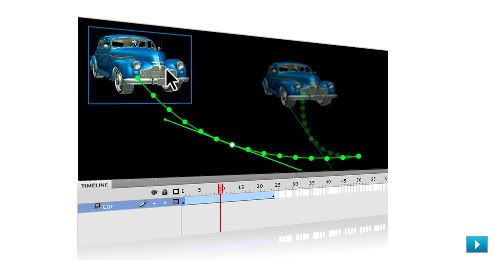
Animating in Flash just got easier
Quickly create animations, easily modify motion paths, and enjoy complete control over individual animation attributes with object-based animation.

Flash now does inverse kinematics
Create chain-like animation effects with a series of linked objects or quickly distort a single shape using the new Bones tool.

Education discounts are available
As a student or educator, you qualify for education pricing. See the full list of products available for purchase.

Flash Player reaches 99% of Internet viewers
Installed on more than 850 million Internet-connected desktops and mobile devices, Flash Player enables you to widely deliver powerful experiences created with Flash.

Features

* Object-based animation


Gain complete control over individual animation attributes with object-based animation, which applies tweens directly to objects instead of to keyframes. Easily make changes to motion with Bezier handles.

* 3D transformation


Animate 2D objects through 3D space with exciting new 3D translation and rotation tools, which allow you to animate along the x, y, and z axes. Apply local or global transformation to any object.

* Procedural modeling with Deco and Spray Brush


Turn symbols into instant design tools. Apply symbols in a variety of ways: Quickly create kaleidoscope-like effects and apply fills using the Deco tool, or randomly spray symbols across any defined area using the Spray Brush.

* Metadata (XMP) support


Add metadata to SWF files using the new XMP panel. Quickly assign tags for enhanced collaboration and better mobile experiences.

* Authoring for Adobe AIR

Deliver interactive experiences to the desktop with new integrated capability to publish to the Adobe® AIR™ runtime. Reach even more audiences across more devices — web, mobile, and now the desktop.

* XFL support

Open content from Adobe InDesign® or After Effects® software and retain file integrity. With the cross-application XFL format, easily import content for further development in Adobe Flash®.

* Inverse kinematics with the Bones tool


Create chain-like animation effects with a series of linked objects, or quickly distort a single shape using the new Bones tool.

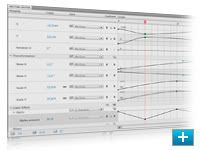
* Motion editor


Experience detailed control over keyframe parameters, including rotation, size, scale, position, filters, and more, using the new motion editor. Refine easing control with graphical displays similar to those in After Effects.

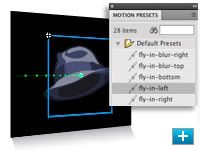
* Motion presets


Jump-start your project with prebuilt animations that can be applied to any object. Select from dozens of presets or create and save your own. Share presets with others to save animation time.

* H.264 support

Encode to any format recognized by the Adobe Flash Player runtime with Adobe Media Encoder, the same tool found in other Adobe video products and now with support for H.264.

System requirements

Windows

* 1GHz or faster processor
* Microsoft® Windows® XP with Service Pack 2 (Service Pack 3 recommended) or Windows Vista® Home Premium, Business, Ultimate, or Enterprise with Service Pack 1 (certified for 32-bit Windows XP and Windows Vista)
* 1GB of RAM
* 3.5GB of available hard-disk space for installation; additional free space required during installation (cannot install on flash-based storage devices)
* 1,024x768 display (1,280x800 recommended) with 16-bit video card
* DVD-ROM drive
* QuickTime 7.1.2 software required for multimedia features
* Broadband Internet connection required for online services*


Line-Technology ©Template Blogger Green ~.

BACK TO TOP