Showing posts with label Security Tool. Show all posts

2009/04/06

Advanced Key and Mouse Recorder v2.9.6

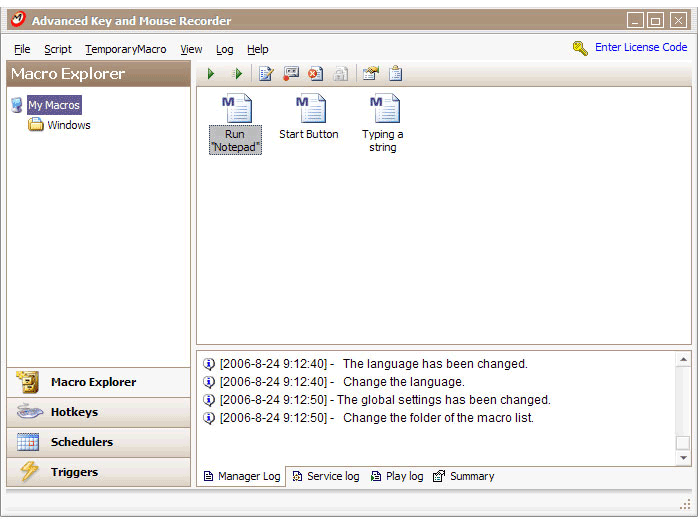
Advanced Key and Mouse Recorder is designed to record and replay the keyboard and mouse activities for automating repetitive tasks. You may utilize it to record and save mouse movements, mouse clicks, and keyboard keystrokes in any application, such as a game, a painting application, a word processor and so on. When you need it, you can replay the recorded activities time after time. With a tightly integrated scheduler, all your recorded activities can replay at a specific time or when some events occur, such as disk free space is low, a removable driver is arrived. Both of the ways give you an ability to do some unattended tasks.

Key Features:

  • Ease of use
    Advanced Key and Mouse Recorder is intuitive and a breeze to use. Tool buttons are used for all of functions because it is handy and clear to most users. Initial trainning and orientation time is reduced, allowing users to focus on producing results rather than learning how to use. No programming skills required!
  • Scheduler
    Every managed macro can be scheduled to play back, you can schedule a macro to run at specific time that is the most convenient for you, the frequency can be minute, daily, weekly, monthly, or at specific time.
  • Trigger
    By Recorder Service, every managed macro can be triggered. It means every triggered macro will be launched when some events occur, such as disk free space is low, an removable driver is removed and much more.
  • Hot key
    Every managed macro can be assigned to a hot key, when the key sequence is pressed, Advanced Key and Mouse Recorder will launch the macro. Sometimes it is the most convenient way to complete a task.
  • TemporaryMacro
    In Advanced Key and Mouse Recorder, macros have two kinds, named macros and TemporaryMacro. The named macros enables you to name, describe, and add a password to protect the actions you record. A named macro can be scheduled and triggered. The TemporaryMacro enables you to quickly capture your mouse and keyboard input without having to name a macro, provide a description for it.
  • Password protected
    You are able to add a password to a named macro. It should help you to prevent unauthorized access to your macro as the password will be required to open the macro.
  • Scope of recording
    In general, recording a macro will capture(record) all mouse actions and keystrokes, but in some case, perhaps you'd like to record either keystrokes or mouse actions, we provide options to do so in Advanced Key and Mouse Recorder.
  • Interface colorable
    Different users - different preferences. For this reason, Macro Expert offers a feature that allows you to adjust the hue and saturation of the appearance to accommodate your favor.
2009/04/03

Trojan Killer 2.0.0.2

If you are an active internet user, you should take steps to protect your sensitive personal information from possible cyber exposure. Trojan Killer will help you to timely identify and safely remove dangerous applications before it is too late. Trojan Killer is a malicious computer software (malware) removal application. Samples of malware include various types of adware (displays unwanted advertising); spyware (may keep and send logs of your keyboard and mouse activity, such as credit card or personal identity information); hidden dialers (may initiate unsolicited phone call which then shows on your bill), and more. Don't wait while malicious programs strike roots in your computer. Don't let them ever reach you PC!
Click the image to open in full size.
Download MediaFire:

2009/03/25

Norton 360 3.0.0.134

  • New! Ultra Fast and Super Light Performance—Norton 360 version 3.0 is a fast and light, all-in-one PC protection solution. It delivers industry-leading protection for your PC and all your online activities while using significantly fewer system resources, so it won’t slow you down.

  • New! Norton Insight scans only those files at risk, saving time and dramatically improving protection with faster, shorter and fewer scans

  • New! Norton Safe Web—identifies unsafe Web sites and suspicious sellers so you can surf and shop with confidence.

  • Improved Norton Identity Safe— protects your identity when you buy, bank, and browse online.

  • Improved Password Manager—automatically detects, stores, and secures logins and passwords so you can have highly secure passwords without ever having to remember them again.

  • New! Norton Pulse Update—provides continuous, non-stop protection against new threats automatically during your subscription period.

  • New! Botnet Detection—prevents others from taking control of your PC to access your private information or use it to host an attack.

  • New! Diagnostic Recommendation—checks your PC to fix common problems and provides recommendations to help you make your PC run better.

  • New! Smart Startup Manager—provides an easy-to-read menu of startup items and allows you to deactivate certain programs so your PC starts up faster.

  • New! Real-time SONAR (Symantec™ Online Network for Advanced Response)—detects emerging spyware and viruses before traditional cures are available.

  • New! Multiple backup destinations and sets allow you store important files to different locations like an external hard drive or secure online storage on different schedules for maximum flexibility.

  • New! Norton™ Drive lets you queue up new or specific files that you need to back up immediately without having to wait for the scheduled backup. The backup will start when your computer goes into idle mode, so it won’t get in the way of your work or play.


2009/03/22

PC Tools ThreatFire 4.1.0.25 PRO - Zero-Day Malware Protection

"ThreatFire 3's ability to block installation of malware strictly by identifying bad behavior is phenomenal. It did a better (and faster) job than Norton AntiBot and even beat out Spy Sweeper, our current Editors' Choice for signature-based anti-spyware. This free tool is an excellent addition to your security arsenal."

(-www.pcmag.com, October 2, 2007-)

Traditional antivirus protection fails you when you need it most - That's when you need ThreatFire

Consumers spend over a billion dollars a year on security software to keep their PCs safe. Every month they spend countless hours configuring and updating their software. And yet every week millions of users are infected by new threats that their traditional antivirus does not stop.

Why? Traditional antivirus solutions cannot protect you until after they've discovered a new threat and produced a signature to counter it.

ThreatFire is different. It does not rely on signatures, but instead constantly analyzes your computer's behavior to detect and block any malicious activity. ThreatFire protects immediately so you know your PC and your valuable data is always secure.

ThreatFire Highlights

- Persistent zero-day threat protection made easy for everyone - even novice users!

- NEW! System Activity Monitor displays detailed data on all running processes and allows you to terminate any process on demand.

- Malware quarantine and removal, rootkit and antivirus scanner, advanced custom rules settings and more!

- Patent-pending ActiveDefense technology intelligently scans and analyzes computer processes to detect and block any malicious activity - without false positives!

- Runs in background without impacting system performance.

- Highest level of out-of-the-box accuracy. No need to configure baffling, technical security settings: just turn ThreatFire on and start blocking malware.

- Perpetually ready for the next malware outbreak - detects malware by watching for malicious behaviors.

- NEW! Enhanced user interface elements provide more technical details on alerts and interactive reports in ThreatFire's main control panel.

- Automatic updates run silently in the background so ThreatFire is always up-to-date.

- Includes PC Tools AntiVirus's on-demand AV scanner, giving you added peace of mind so you can quickly and easily scan your PC for known threats.

- Protects against both known and zero-day viruses, worms, trojans, buffer overflows, rootkits and even some spyware.

- Works alongside most other security programs - there is no need to uninstall your antivirus, anti-spyware, firewall or other security program before installing ThreatFire.

How ThreatFire™ Works

ThreatFire uses advanced patent-pending technology to detect signs of malicious behavior commonly used by malware threats. ThreatFire is unlike traditional antivirus products that rely on old fashioned "signature" technology and require updating every time a new threat occurs.

By constantly monitoring the activity on your PC ThreatFire's ActiveDefense technology is able to hunt down and paralyze threats that are too new or too clever to be recognized by traditional security software.

ThreatFire employs an intelligent behavioral engine to only alert you on truly malicious behavior, because sometimes even legitimate software may look malicious. This means you are only alerted when you really need to be.

Protection Coverage

Traditional Security Product Solo vs. Traditional Product with ThreatFire


Select Your Choice for Advanced Behavioral Detection


ThreatFire Version Information

Current Version: 4.0.0.8
File Size: 22 MB
Release Date: October 21, 2008
Operating System: Windows® Vista™, XP, 2000 and 2003


  • Size: 7.55 MB
  • Download Here
  • REG:


  • License Name:   jean jean
    License Code: GNJ8ER-EEXEKJ-J9CG6X-MAERWZ-KQQZ42-676EJ0
Or Download Full version 4.1 here

2009/03/15

One Click Privacy v2.2.5

Your computer is a treasure trove of secrets just waiting to be exposed. Cover your tracks and secure your sensitive information with affordable and powerful One Click Privacy software. Peace of mind is just one click away. Feel secure in the knowledge that with One Click Privacy, nobody will have anything on you. Your personal life should remain exactly that… personal.

Features:

  • Permanently erases all internet activity and history
  • Deletes records of websites visited, cookies, passwords, ID’s, banking and credit card information
  • Secure trash feature guarantees sensitive information is permanently deleted
  • One Click Privacy cleans all records generated by all major P2P apps including Bit Torrent Client, Kazaa, LimeWire, Morpheus and more
  • Erases Instant Messaging and Voice Over Internet Protocol files
  • Erases media player records such as Windows Media Player, QuickTime, RealPlayer and more
  • Removes records of search queries from desktop search applications
  • Deletes history of recently opened software and email applications
  • Erases browser activity logs from Internet Explorer, Firefox, Netscape, etc
  • Free email tech support for life
  • Automated and easy to use

2009/03/04

Anti-Trojan Elite 4.4.5

Anti-Trojan Elite™ (ATE) is a malware remover, it can detect and clean malware in disk or memory. Malware is software designed specifically to damage or disrupt a system, such as a trojan horse, a spyware or a keylogger. ATE contains a Real-Time File Firewall, it monitor system and clean malwares immediately. It is also a system security tools, you can view and control processes and TCP/IP network connections. Anti Trojan Elite provide a real-time malware firewall for user, once a trojan or keylogger would been loaded, the ATE can detect, block and then clean it in time. The ATE can detect more than 35000 trojans, worms and keyloggers currently, and the number of malware ATE could clean is growing up very quickly, we collect world-wide malwares, user can using our auto live update feature to get the power to clean these new malwares in time.
Anti Trojan Elite has some useful utilities especially. The network utility can been used to disconnect suspicious TCP connections; The process utility can been used to kill suspicious processes even the process has the system priviage, even it has the ability to unload suspicious modules in all processes; The registry repair utility can been used to repair registry altered by malware; The registry monitor utility can been used to repair any change of important registry keys and values with real time.
THE REASONS CHOOSE ANTI TROJAN ELITE:
• Real-time malware firewall, protecting user's computer in real-time.
• Detecting and cleaning binded malware, doesn't hurt normal file and clean the malware.
• Detecting and cleaning no process malware, some malware don't have a EXE file, they are only some DLL files and running as some threads in other process, ATE can detect and clean this type of malware even it's running.
• Free tools. View the information of Tcp/Ip states and processes informations.
FEATURES:
• Disk and memory scan supported.
• Real-time malware firewall.
• Compressed files (RAR ZIP CAB) scan supported.
• Backup module: Backup trojan files before killing.
• Network Manager. View the tcp/udp states and the processes they belonged to. User can disconnect any tcp connection and stop the opposite process.
• Process manager. View the processes and its DLL modules' information. User can terminate any process and unload any DLL module.
• Internet Explorer and registry repair utility.
• Updating online supported, and auto check updates when ATE starts.
• Real-time registry monitor utility.
Supported OS: Windows 98 ME 2000 XP 2003 VISTA

2009/03/03

Nsasoft SpotMSN v1.8.3 - Recover your MSN and Live Messenger Passwords Instantly!

SpotMSN- Recover your MSN and Live Messenger Passwords Instantly!

SpotMSN is a password recovery tool that is used to recover lost or forgotten passwords for your MSN messenger, Windows Live Messenger 8 and Windows Messenger accounts. SpotMSN is the best MSN password finder that instantly cracks and decrypts the MSN Messenger passwords saved on your computer. Program works when the "Remember my Password" tickbox is checked in the messenger.

2009/02/27

AK-Protection Logic 3.1 - protect your system

AK-Protection is not only protection system but it also enables you to Control your system and allow you to
select what the other users do.

In this list you will find any strange application. So you can understand, what is the application that is really
running in your system and even the sub application and 16bit application, 32bit application and 64bit
application, is detailed in the 'Unknown Applications'
list.

And the first thing you can do here is investigate this application.

How to investigate an unknown application?

To do that, you have many choices with 'AK-Protection', so you can do that by switching the view style to
'details', and when you do that you can see more information about the unknown application, and now let's see
how these details can give you clear understanding of 'Unknown Applications'.

  • Process Name:-
  • The name that the system uses to identify the process to the user.

    Remarks:
    The ProcessName holds an executable file name, such as Notepad, that does not include the .exe
    extension or the path. It is helpful for getting and manipulating all the processes that are associated with
    the same executable file. And now let's get deeper into Process Name.

    For example, if the Notepad 'notepad.exe' is running you will see 'notepad' in the 'Process Name' cell,
    but if the name of 'Notepad' has changed from 'notepad.exe' to 'a.exe' the process name will be 'a' and
    AK-Protection is allows you to understand if this change happens through 'Process Name' and 'Original
    File Name'.
  • Original File Name.
  • The original name the application is created with.

    Remarks:
    Original File Name determines whether a file has been renamed.
    So by returning to the previous example if 'Notepad' name has changed from 'notepad.exe' to 'a.exe' the
    process name will be 'a' but the Original File Name will remain 'notepad.exe'. And by this way you can
    understand any try to mislead. And if that happens you can easily Terminate this application through
    'Terminate' feature.
  • Version
  • The version number of the application.

    Remarks:
    Typically, a version number is displayed as "major number, minor number, build number, private part
    number". A file version number is holds the version number for a file as follows:

    The first part is the FileMajorPart number.
    The next part is the FileMinorPart number.
    The third part is the FileBuildPart number.
    The last part is the FilePrivatePart number.
  • Company Name.
  • The name of the company that produces the application
  • Legal Copyright.
  • The copyright notices that apply to the specified file.

    Remarks:
    This should include the full text of all notices, legal symbols, copyright dates, and so on.
  • Path.
  • The path of the application.
The other way to investigate an unknown application by right click on any application and select get Path and
you can get the folder that consists the application and you can understand if this programs is installed
because of your or not.


  • Tip: If you find any difficult to understand any unknown application you can easily Terminate
    it. The Unknown applications is an intrusive application and terminating this type of
    applications improves the performance. Because you will release the size and the process with
    this application used to run.
    :hp:


2009/02/15

Avira AntiVir Premium + Free v8.2.0.377 + License Keys - protects you against all threats

Avira AntiVir Premium reliably protects you against all threats from viruses, worms, trojans, rootkits, phishings, adware, spyware, bots, and dangerous “drive-by” downloads. Best detection rates and top-class security with several updates every day.
Advanced protection: Includes basic antivirus protection PLUS: email protection (POP3) , AntiPhishing, AntiSpyware, AntiAdware and more. With real-time on-access scanning, profile-based on-demand scans and scheduling of full system scanning and updates it offers premium protection. It includes a POP3 based MailScanner that scans emails before they are stored on your machine. With a user-friendly control center, quarantine management, fast performance and world leading detection rates the Avira AntiVir Premium provides essential protection for your PC.

AntiVir Personal offers effective protection against computer viruses for the individual and private use on a single PC-workstation. It detects and removes viruses and includes an Internet-Update Wizard for easy updating. The built in resident Virus Guard serves to monitor file movements automatically, for example when downloading files from the internet. Heuristic scanning protects Protection against previously unknown macro viruses. Even though viruses have now grown very numerous, one thing hasn't changed: our commitment to provide you with all-round protection. The reliability of AntiVir is demonstrated in numerous comparison test and references featured in independent trade journals.

Premium Protection:
* AntiVir
* AntiAd/Spyware
* AntiPhishing
* AntiRootkit
* AntiDrive-by
* AntiBot
* EmailScanner
* WebGuard
* RescueSystem

Premium functions:
• Protection against viruses, worms and Trojans
• Protection against expensive dialers
• Detects and deletes rootkits
• NEW: Raised scan speed
• NEW: Redesigned visual appearance
• Protection against phishing
• Protection against spyware
• Special protection against email viruses (POP 3)
• Fast updates through Premium Server
• 5 Euro donation to Auerbach Foundation
• Protection against annoying adware
• NEW: System to create a Rescue-CD

Operating system: Windows 2000 (SP 4 recommended) / Windows XP and XP 64 Bit (SP 2 recommended) / Windows Vista 32 Bit and 64 Bit

Avira Home spacer

Hide Files and Folders v3.3 - password-protected security utility

Hide Files and Folders v3.3

Hide Files and Folders is a great easy-to-use password-protected security utility working at Windows kernel level you can use to password-protect certain files and folders, or to hide them securely from viewing and searching just with a click of mouse. Upon accessing any protected file or folder, dialog box querying password appears on the screen. If valid password entered,user gets access to the file or folder, otherwise not. Hide Files and Folders does not modify your media: in protecting your files or folders, it just uses a high-reliability VXD driver working at Windows kernel level. This guarantees that Hide Files and Folders will never lose your data, as may happen if you use other file- and folder-protecting software. Due to unique technology, the program also lets you protect system files and folders such as the Windows System, Registry and Swap files. Go ahead! Download the program right now! You will find it very easy to use

Release Group: LiGHTHELL
Release Name: Hide.Files.and.Folders.v3.3-LiGHTHELL
Release Date: Feb-08-2009
Release Type: Crack
Protection: None
Filename: hiffaf3.rar
Source: PC Appz
Size: 1.07 MB
Hide Files and Folders v3.3

2009/02/08

Norton Internet Security 2009 & AntiVirus 2009 16.2.0.7 with Trial Reset

Norton Internet Security 2009 & AntiVirus 2009 with Trial Reset crackNorton Internet Security 2009 - Strong on protection, light on system resources, award winning!
* Proven fastest security suite
* Blocks online identity theft
* Faster, fewer, shorter scans
* Up-to-the-minute protection

Stay protected from the latest online threats. Norton Internet Security runs quietly in the background to detect and block today's complex threats and to protect your identity when you buy, bank, or browse online. The friendly and efficient product design helps minimize confusing security alerts and system slowdowns that can get in the way of
your online experience.
Norton AntiVirus 2009 - Winning protection against viruses, spyware, and other malicious threats
* Stops viruses, spyware, and more
* Up-to-the-minute protection
* Rapid pulse updates every 5 to 15 minutes
* Faster, fewer, shorter scans

Download Trial Reset Here

2009/01/24

Avira AntiVir Premium v8.2.0.373 + License Keys

Avira AntiVir Premium reliably protects you against all threats from viruses, worms, trojans, rootkits, phishings, adware, spyware, bots, and dangerous “drive-by” downloads. Best detection rates and top-class security with several updates every day.
Advanced protection: Includes basic antivirus protection PLUS: email protection (POP3) , AntiPhishing, AntiSpyware, AntiAdware and more. With real-time on-access scanning, profile-based on-demand scans and scheduling of full system scanning and updates it offers premium protection. It includes a POP3 based MailScanner that scans emails before they are stored on your machine. With a user-friendly control center, quarantine management, fast performance and world leading detection rates the Avira AntiVir Premium provides essential protection for your PC.

AntiVir Personal offers effective protection against computer viruses for the individual and private use on a single PC-workstation. It detects and removes viruses and includes an Internet-Update Wizard for easy updating. The built in resident Virus Guard serves to monitor file movements automatically, for example when downloading files from the internet. Heuristic scanning protects Protection against previously unknown macro viruses. Even though viruses have now grown very numerous, one thing hasn't changed: our commitment to provide you with all-round protection. The reliability of AntiVir is demonstrated in numerous comparison test and references featured in independent trade journals.

Premium Protection:
* AntiVir
* AntiAd/Spyware
* AntiPhishing
* AntiRootkit
* AntiDrive-by
* AntiBot
* EmailScanner
* WebGuard
* RescueSystem

Premium functions:
• Protection against viruses, worms and Trojans
• Protection against expensive dialers
• Detects and deletes rootkits
• NEW: Raised scan speed
• NEW: Redesigned visual appearance
• Protection against phishing
• Protection against spyware
• Special protection against email viruses (POP 3)
• Fast updates through Premium Server
• 5 Euro donation to Auerbach Foundation
• Protection against annoying adware
• NEW: System to create a Rescue-CD

Operating system: Windows 2000 (SP 4 recommended) / Windows XP and XP 64 Bit (SP 2 recommended) / Windows Vista 32 Bit and 64 Bit

Avira Home spacer

2009/01/15

Dr.Web 5.0.0.0 Portable

Dr.Web 5.0.0.0 Portable | 13.45 Mb - Anti-Virus Scanner without installation.
Extract and run DrWebPortable. Dr.Web anti-virus for Windows. Anti-virus ? best active infection curing. Anti-rootkit ? reliable protection against malicious programs featuring rootkit technologies. Anti-spyware ? security of your personal information ? best of breed detection of Trojans and key loggers.
Key features
- Detection and neutralization of malware on hard drives, removable data storage devices and in RAM
- Real-time interception of calls to files on hard and floppy drives, CD/DVD/Blue-ray/Flash drives, and smart cards
- Detection of viruses placed in an archive at any nesting level
- New! The FLY-CODE technology allows checking files compressed by unknown packers
- Protection against unknown threats powered by non-signature detection technology Origins Tracing? and the intelligent heuristic analyzer
- Protection against mass mailings performed by a mail worm from an infected machine
- Protection of account information related to online games, social networks, electronic money systems, credit card numbers and PIN codes
- Detection of spam-bots
- Virus scan of SMTP/POP3/NNTP/IMAP traffic
- On demand/scheduled scan
- Individual scan schedules
- Automatic updating
http://www.securitylab.ru/upload/iblock/115/115359ee3cbf29af6cf9b8845d202a83.jpg

DOWNLOAD
Download Here Via Letitbit
OR
Download Here Via Uploading
OR:
Download Here Via MediaFire

ESET v3.0.x Offline Cumulative Updater 3735

ESET v3.0.x Offline Cumulative Updater 3735Steps
Choose a location and Extract the self-extracting archive.
Then Manually update the definition.
If the folder C:Update exists and already contains definitions, they will be automatically overwritten/updated and the latest ones will be added
- Configure your ESET 3.x product as follows:
* For ESET NOD 32 3.x
- Go to Control Center, Update modules, NOD 32 Update
- Click Servers, add C:Update as new server and click accept/ok
- Close all opened windows and Update ESET NOD 32 from tray icon
* For ESET Smart Security 3.x
- Toggle to display Advanced mode
- Go to Setup, choose Advanced setup
- Go to Update, right to the field 'Update server', click Edit
- Under Update servers, add C:Update as new server, click Add and OK
- Close all opened windows and Update ESET Smart Security from tray icon
Download: 20 MB
Download Here Via EasyShare
MediaFire download here

McAfee® Total Protection™ 2009

McAfee® Total Protection™ is hassle-free, all-you-need security ideal for people who are constantly online for communication, shopping, banking, trading or viewing entertainment. It features the award-winning McAfee SiteAdvisor® Plus web security tool that warns about and blocks risky web sites. McAfee® Total Protection™ protects your family and entire network of PCs from viruses, spyware, hackers, identity thieves, and online scammers. It also offers parental controls.

McAfee® Total Protection™ is now available with revolutionary Active Protection technology, providing immediate protection against malicious threats to your PC. A new threat can be analyzed and blocked in milliseconds, rather than waiting hours for traditional techniques. Active Protection is the best technology to keep you safe from emerging online threats.

With unmatched performance, McAfee® Total Protection™ runs silently in the background without slowing down your PC, boasting faster start-up, shut-down and scan times.

McAfee’s security products use award-winning technology, are easy to install, and come with unlimited email and chat assistance. With continuous and automatic updates, McAfee ensures that you’re running the most current security to combat the ever-evolving threats on the Internet for the duration of your subscription.

An Internet connection is required to install this software and to receive automatic updates and upgrades to keep your security up to date. You may install this product on up to 3 computers in your home.

FEATURES
  • Anti-virus
  • Anti-spyware
  • Anti-spam
  • Anti-phishing
  • Two-way Firewall
  • Advanced Web Site Safety Ratings
  • Identity Protection
  • Parental Controls
  • Data Backup

SYSTEM REQUIREMENTS
  • Microsoft® Windows 2000 with Service Pack 4 (SP4) or higher,
  • Windows XP with Service Pack 1 (SP1) or higher,
  • Windows Vista* and Windows Vista Service Pack 1 (SP1) or higher
  • 800 X 600 or higher resolution
  • 256 MB RAM
  • 75 MB of available free drive space
  • Internet connection
  • Microsoft® Internet Explorer 6.0 or later
  • Optional: Mozilla Firefox 1.5 or later
Supported Email Programs
  • POP3 – Outlook Express, Outlook, Eudora, Netscape, IncrediMail and Thunderbird; Japanese only: Shuriken, Becky and PostPet
  • MAPI – Outlook
  • Web – MSN/Hotmail, or email account with POP3 access
Supported Instant Messaging Programs:
  • AOL Instant Messenger 2.1 or later
  • Yahoo Messenger 4.1 or later
  • Microsoft Windows Messenger 3.6 or later
  • MSN Messenger 6.0 or later
Required For Anti-Spam Toolbar Plug-In:
  • Outlook Express 6.0 or later
  • Outlook 2000 or later
  • Eudora 6.0 or later
  • Thunderbird 1.0 or later
  • Anti-Spam also supports any other POP3 email client (without SSL) and Web accounts (MSN/Hotmail paid accounts and accounts with POP3 access)


Faronics Anti-Executable Standard Edition v3.0.1111.23

Prevents unauthorized or unwanted programs from being installed.

Anti-Executable offers a revolutionary method to keep users on task and highly productive.

Using its unique whitelist technology, Anti-Executable standardizes any environment by preventing all unauthorized or unwanted programs from being installed, regardless of whether they are downloaded from the Internet or introduced via any removable media.

Anti-Executable provides total system control, restricting the user's ability to run or install any new executable program. On install, Anti-Executable performs a deep scan of the computer and authorizes every executable on it. From that point on, any other executable program is deemed unauthorized and will not run or install.
Faronics Anti-Executable Standard helps you increase your PC's performance and security by preventing unauthorized installations.

Whitelist Features
Automatically creates whitelist upon install
Definition files do not need to be updated
Full access to all computer functions
Creates a log of all unauthorized installation attempts
Restricts copying of any executable files to the desktop or any other area
Restricts deletion or re-naming of any executable files
Restricts the launch of executables from all or part of your network

Compatibility Options
Compatible with Deep Freeze
Compatible with major third-party antivirus and anti-spyware applications
Complements active directory and group policies
Compatible with fast user switching
Offers option to designate specific applications, such as antivirus programs, to be Trusted and exempt from protection
Provides exemption of local folders or network paths, with the option to include subfolders

Expanded Protection and Control
Operates in any user mode, including Administrator
Provides password protection for complete security
Offers ability to enable or disable Anti-Executable on the fly
Provides silent install for rapid network deployment
Deploy as part of a master image
Provides two different security levels to suit various needs
Displays a customized violation message when a user attempts to perform an action that is not authorized by Anti-Executable
Allow or Block execution of applications from CD/DVD drives

Download
Download here via RapidShare
OR
Download here via RapidShare

Portable Kaspersky Anti-Virus 8.0.0.506 En-Fr-Ru

Anti-Virus Scanner (more infos) without installation.Extract (with a PortableApps folder at the device's root) and run KAV8Portable.
Only scanner: no monitor.
Not actived but you can update bases after each launch.

Language fixed by launcher according UserDefaultLang.

Download Portable KAV on RapidShare (36 MB)
DOwnload MEDIAFIRE

2009/01/11

Trojan Remover 6.7.5 Build 2560 + Portable [DL]

Trojan Remover aids in the removal of Malware - Trojan Horses, Worms, Adware, Spyware - when standard anti-virus software either fails to detect them or fails to effectively eliminate them. Standard antivirus programs are good at detecting this Malware, but not always so good at effectively removing it. Trojan Remover is designed specifically to disable/remove Malware without the user having to manually edit system files or the Registry. The program also removes the additional system modifications some Malware carries out which are ignored by standard antivirus and trojan scanners.

Trojan Remover scans ALL the files loaded at boot time for Adware, Spyware, Remote Access Trojans, Internet Worms and other malware. Trojan Remover also checks to see if Windows loads Services which are hidden by Rootkit techniques and warns you if it finds any. For each identified Trojan Horse, Worm, or other malware, Trojan Remover pops up an alert screen which shows the file location and name; it offers to remove the program's reference from the system files and allows you to rename the file to stop its activation.
Most modern Malware programs are memory-resident, which makes their de-activation more difficult. How many times have you been told to start your computer in 'Safe' mode, or even worse, in DOS? Trojan Remover does all this for you. When it finds Malware that is memory-resident, Trojan Remover automatically re-starts (on request) your system and completely DISABLES the Malware before Windows restarts.
Trojan Remover writes a detailed logfile every time it performs a scan. This logfile contains information on which programs load at boot-time, and what (if any) actions Trojan Remover carried out. The logfile can be viewed and printed using Notepad.
Trojan Remover is set to automatically scan for Malware every time you start your PC (you can disable this automatic scan if you wish).
Trojan Remover is designed to work on Windows 98/ME/2000/XP/Vista. The program is not, at present, compatible with any 64bit version of Windows.
Changes in Version 6.7.4:
* Added new heuristic rootkit agent detection routine.
* Improved removal techniques for TDSS rootkit.
* Improved heuristic detection for Trojan.VirtuMonde.
* Added routine to reset Windows Update Service when it has been disabled by Trojan.VirtuMonde.
* Added routine to remove older Trojan Remover Uninstall entries.


ESET Smart Security/NOD32 Antivirus BETA 4 Beta Version

ESET Smart Security Business Edition is a new deeply integrated solution providing endpoint security for businesses of all sizes. ESET Smart Security brings the speed and precision of ESET NOD32 Antivirus and its powerful ThreatSense® engine and combines it with custom engineered firewall and antispam solutions - constantly vigilant in keeping computers safe from malware and other internet threats. ESET Smart Security Business Edition features the ESET Remote Administrator to ensure smooth updating and centralized management in networked environments. ESET Remote Administrator allows fast setup and eases administration of all the machines in a local and wide area network. ESET Smart Security Business Edition ensures optimal performance of the systems and networks and reduces bandwidth consumption.
Eset Nod32 Antivirus 4 {Beta Version}

Line-Technology ©Template Blogger Green ~.

BACK TO TOP